Why Is Payroll So Painful in Property Management?
Property management companies that operate across multiple buildings often run payroll from disconnected spreadsheets, handwritten logs, and emailed timesheets. The result is predictable: late pay runs, compliance gaps, and hours wasted on data entry that software should handle.
82%
of property managers still use manual processes for at least part of their payroll workflow, according to AppFolio's 2024 Industry Report.
5.2 hrs
Average weekly time spent on payroll administration per property portfolio, as reported by NARPM's 2024 Operations Survey.
33%
of small property firms have faced payroll compliance penalties, per the IRS Data Book 2023.
What Does Payroll Integration Include?
Everything between a staff member clocking in and your payroll provider cutting the check. No middleware, no manual re-keying.
Multi-Format Payroll Exports
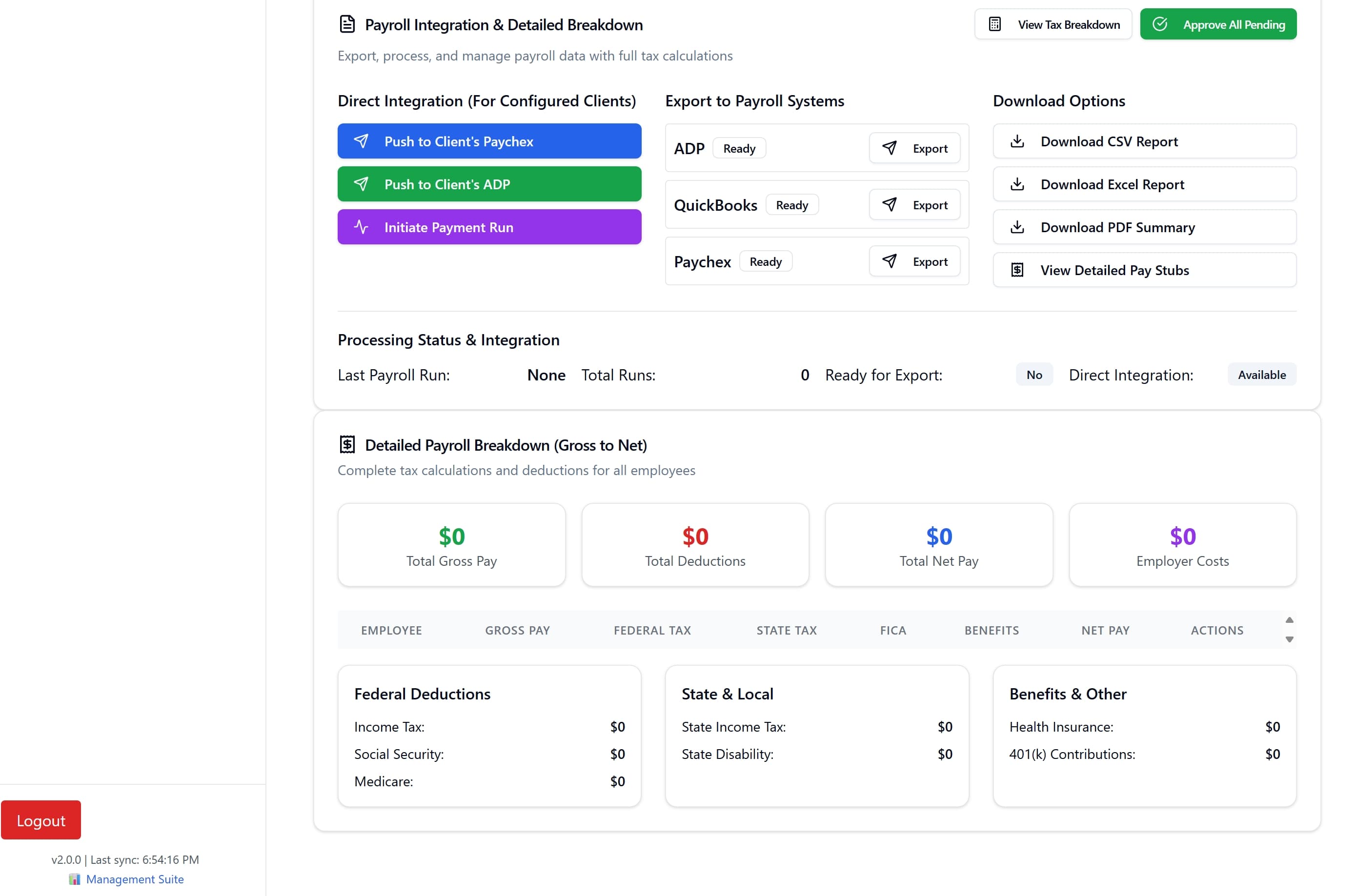
Generate payroll-ready files in the format your provider expects. QonsApp supports direct exports for ADP, Paychex, and QuickBooks, along with universal CSV, Excel, and PDF formats for any other payroll system.
Automated Timesheet Collection
Stop chasing paper timesheets across multiple properties. Clock-in and clock-out records flow automatically from every site into a single payroll queue, with overtime and break rules already applied.
Built-In Compliance Checks
Each export runs through validation rules that flag missing punches, unapproved overtime, and shifts that exceed local labor-hour limits. Errors surface before the file reaches your payroll provider.
One-Click Pay Period Closing
Select a pay period, review the summary dashboard, and export. Supervisors approve timesheets at the property level, and payroll administrators close the period from a single screen.
Sync Across Properties
Staff who float between buildings appear on one consolidated timesheet. Hours are broken out by property for cost-center reporting while the employee receives a single pay stub.
Role-Based Payroll Access
Payroll data is sensitive. QonsApp restricts export access by role so that site supervisors can approve hours but only authorized payroll staff can generate or download the final files.
How Does the Payroll Export Process Work?
Three steps replace the spreadsheet chaos. Time tracking, supervisor approval, and formatted export happen inside one platform.
Staff clock in and out at each property
Concierge teams, maintenance crews, and security staff record their hours through the QonsApp mobile or desktop interface. GPS verification confirms they are on-site. Shifts, breaks, and overtime are logged automatically against the schedule set by their supervisor.
Supervisors review and approve timesheets
At the end of each pay period, property supervisors see a summary of all hours worked at their site. They can flag discrepancies, add notes, and approve the timesheet in bulk. Unapproved timesheets are blocked from export.
Payroll administrators export to their provider
Once approved, the payroll team selects their provider format, whether that's ADP Workforce Now, Paychex Flex, QuickBooks Online, or a generic CSV template. The file downloads with the correct column mapping, tax codes, and department breakdowns ready for import.
Which Payroll Providers Are Supported?
QonsApp generates export files formatted for the most widely used payroll platforms in North American property management. If your provider accepts CSV imports, it works.
Works Best Alongside These Features
Payroll integration doesn't exist in isolation. Pair it with scheduling, property dashboards, and analytics for a complete operations platform.
AI Scheduling
Auto-generate shift schedules that feed directly into the timesheet and payroll pipeline.
Multi-Property Dashboard
View labor costs and timesheet status across your entire portfolio from one screen.
Executive Analytics
Turn payroll data into staffing insights with cost-per-property breakdowns and overtime trend reports.
Frequently Asked Questions
Does QonsApp send data directly to my payroll provider?
QonsApp generates formatted export files that you upload to your payroll provider. This keeps your payroll credentials off third-party servers and lets you review every file before it goes in. Direct API integrations with ADP and Paychex are on the roadmap.
Can I run payroll for staff who work at multiple properties?
Yes. Floating staff hours are consolidated into a single employee record while maintaining per-property cost breakdowns. Your payroll export shows one line per employee with optional department or location columns for internal accounting.
What happens if a timesheet has errors?
The validation engine flags missing clock-outs, overlapping shifts, and unapproved overtime before you can export. Supervisors receive a notification to correct the records. You cannot close a pay period until all flagged items are resolved.
Is there a limit to how many properties I can run payroll for?
No. QonsApp is built for multi-property operations. Whether you manage three buildings or three hundred, the export process is the same. Pay periods, approval workflows, and export formats are configured once and applied across your portfolio.